Voting

Eligible players vote on proposed server changes through the Discord.

Eligibility

Discord
A linked account
Playtime
At least 36 hours of playtime on the server
Membership
7 days old linked account, since first join
Banned
Banned players are disqualified from voting

Unlinked players can still join and play normally. Unlinking an eligible account removes its voter status automatically.

Discord voting

  1. 01

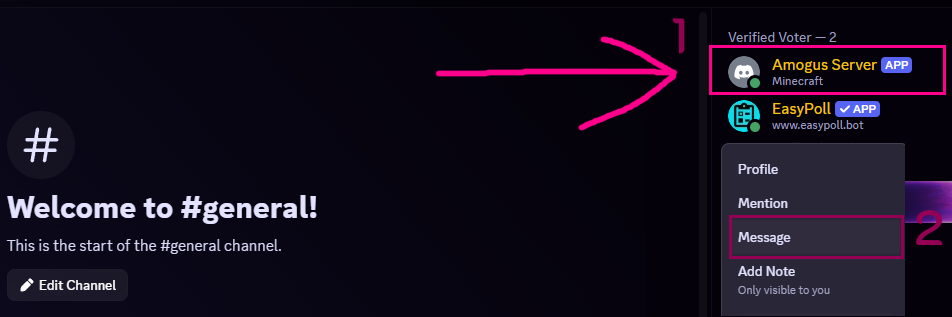
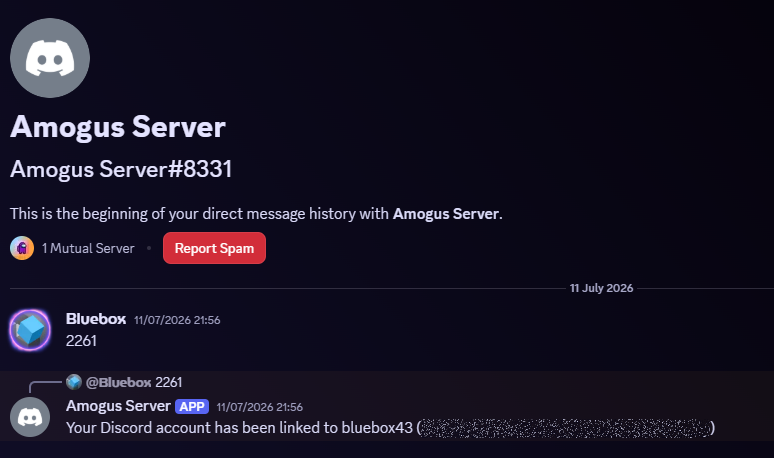
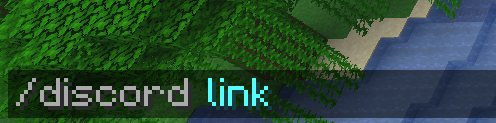
    Link your accounts

    Connect your Minecraft account to Discord using the illustrated guide below.

  2. 02

    Receive the voter role

    Once all requirements are met, the Verified Voter role is assigned automatically, normally within five minutes.

  3. 03

    Vote on changes

    Players can create polls to vote on server changes.

  4. 04

    More info

    More information can be found on the Discord at the "voting" channel.

Automatic eligibility

The server checks the account link, playtime and first-join date, then synchronizes the Verified Voter role used for Discord server polls.

Voting

How voting works.

Proposed changes can be discussed in the vote-discussions forum on Discord. Once a petition has gathered enough support, it will be turned into a poll.

  • Polls are posted in the Discord voting channel using EasyPoll.
  • Polls normally remain open for two days.
  • Each poll shows the question, available choices, voting deadline and eligible role.
  • Only members with the Verified Voter role can use the answer buttons.
  • Select one option using the corresponding button beneath the poll.
  • Votes are visible, not anonymous.
  • If a poll ends in a tie, the server owner chooses the winning option.

Want to take part? Follow the account-linking instructions above to become a Verified Voter.

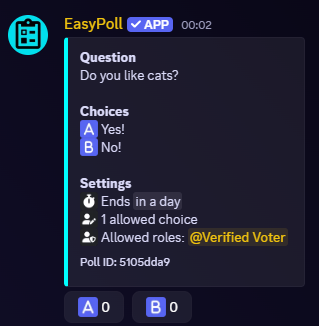
Example EasyPoll Discord poll with two choices restricted to the Verified Voter role
An example poll with two choices and one allowed answer.